Internet Blues

•July 5, 2009 • Leave a Comment

Hey everyone! Ya so I arrived here in Hong Kong on Saturday. I’ve been pretty busy with trying to settle in. It’s just how I remembered it and I am really hoping I can move here in the future. Anyways one thing that I am really disliking here in Hong Kong is the internet speeds. I’ve heard Asia in general i.e. Japan, South Korea has pretty good speeds. Well I don’t think this is the case with Hong Kong. Ever since I’ve got here Friday, it has been taking an unbelievable amount of time to just bring up a website. Once the page is up it is a little better. I’m not sure who the carrier is that I am using, but I guess it could be the DNS settings. I might try and change them to OpenDNS and see if that takes care of the problem. But my friends tell me the reason for the internet being slow is because in this particular area I am living temporarily in Hong Kong has probably close to a 100,000 if not more.

I have been taking pictures and I will be uploading some more on flickr, but until then I do have some pictures uploaded already! Please check them out if you want to! My flickr page is http://flickr.com/photos/brandonnc well thanks everyone and I’ll write again tomorrow!

Airport Experiences

•July 3, 2009 • Leave a Comment

Airport Experiences

Well as you all know I have finally reached my destination, which is Hong Kong! I am have been planning this trip for well over seven months. Anyways I’d like to share briefly my experience I encountered in the different airports that I traveled in to reach my destination. Well I left out of Raleigh North Carolina (RDU Airport) and I ended up getting there three hours before my plane left… Let’s just say that it was a very boring wait. I actually wish I had waited a little longer, because I could of spent the extra time with my family before leaving. But I have only been on an airplane twice in my life (this being the second time) and I did not know what to expect. Last year I also went to Hong Kong, but I traveled over to HK with a group. This time I was traveling over to Hong Kong by myself and then meeting a group of friends over there.

So overall it was extremely easy to find my different gates and checkpoints. I was a little nervous once I arrived in the Canadian airport. I did not stop at the International Toronto Airport last year, so I was not quite sure as of where to go at some times. But thankfully the majority of the Canadians that I met were very pleasant and very helpful. I did notice a pretty diverse culture in the airport and throughout my hotel. Oh just a word of advance, do not travel to Canada on Canada Day unless you want to be shedding out some extra dough… I did not do a lot because everything was a little expensive, I guess because of the tourists.

The funny thing is that Hong Kong is celebrating their return to China after being colonized by the Brits for 100 years on the 3rd I believe. So I will be able to experience Canada Day and Hong Kong return to China. I only hate that I will be missing the 4th of July. I really enjoy watching the fireworks and celebrating my nation’s heritage.

Anyways thats all for now, I’m a little tired and there is not much to report on for the time being. Especially since I just arrived here in Hong Kong and I need to get some necessities.  Plus I need to grab a bite to eat! 😛 Until later guys, zaijian!

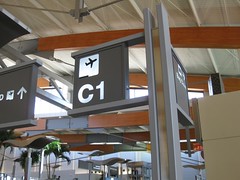
C1- My Gate to Toronto-Hong Kong

•July 1, 2009 • Leave a Comment

So this is the gate that has taken me to Toronto, Ontario for my 13.5 hour layover… I’m only here in Canada for a little while and then I board my airplane to Hong Kong! I was lucky enough to come to Canada on Canada Day! What a coincidence! Anyways I flew with Air Canada and that is possibly why I had a layover in Toronto. Everyone has been extremely nice, except the custom’s agent. She frustrated me a little bit. Also to my surprise a lot of people speak French here in Toronto. I figured Ontario was a mostly English speaking Canadian province. I knew British Columbia spoke French and what not. Anyways I wish I could of stayed a little longer to explore, but my journey is for Hong Kong! Anyways I’ll write another blog post once I get in Hong Kong. It’s getting kind of late and I have to be at the Toronto Airport at 8am eastern standard time. Anyways later!

Mobile Phone Usage Overseas

•June 21, 2009 • 2 Comments

If you plan on using a cell phone in Hong Kong/ China, you probably would not want to pay international roaming fees and what not. Paying international roaming fees would probably cost you a fortune, especially if your with an North American cell carrier. There is a way around this. If you are in the U.S. then you kind of have a limited amount of choices to get around this dilemma. Here in the United States we have various different kinds of cell frequencies, CDMA, GSM, and some less popular cellphone frequencies. Allow me to give you a quick summary. Verizon Wireless and Sprint utilize the CDMA frenquency here in the United States, whereas AT&T and T-Mobile utlize the GSM frenquency. Unfortunately if you use Sprint and Verizon it will be a little difficult. If you are with AT&T or T-Mobile then you are in good luck. Before leaving the U.S. you will need to call either AT&T or T-Mobile and ask them you would like a code to unlock your cell phone. Sometimes this is called a NCK code. This is a simple process, but if it does not work the first time, do you enter in your key again. Please contact your mobile service providers again. If you enter the unlocking code too many times, you could permently lock your phone. Anyways if you do not want to go through this process you can also buy unlocked phones, either here in the U.S. or buy a cheap phone in Hong Kong. All the phones offered in Hong Kong/ China are unlocked. You can find phones online as low as $50, but in Hong Kong they are a little more expensive. I bought a Nokia N95 last year, which is an unlocked phone. It’s a quadband phone so I will have no problem using it in Hong Kong. If you plan on buying an unlocked phone, make sure to look for an unlocked tri-band or quad-band GSM phone. If you look for those minimum requirements, then you will be in great shape. So now that we can use your phone overseas, what about a mobile service provider in Hong Kong. Tomorrow I will do a post on two of the major cell providers in Hong Kong. Until then take care!

http://en.wikipedia.org/wiki/Tri_band

http://en.wikipedia.org/wiki/Quad_band

http://en.wikipedia.org/wiki/Cellular_frequencies

http://en.wikipedia.org/wiki/GSM_frequency_bands

Weather Updates

•June 14, 2009 • Leave a Comment

Neiho everyone! I am going to try and do a lot more blog entries as my trip date draws closer and closer! I am extremely excited! I will be leaving on the 1st of July. Anyways today is an important tip that can be easily overlooked.

It is often a great idea to keep an eye out on the weather that your travel destination endures. I recommend keeping an eye on your travel destination’s weather forecast a month or two before your trip. This will give you a pretty accurate idea of what your trip is going to look like. It will also help with your plans of travel and the different activities that you could look in to if the weather goes unplanned.

There are different ways to moniter the forecast for your travel destination. If you have an iPhone or iPod Touch you can use the weather app built in. If your using Windows Vista or Windows 7 you have the choice of setting the weather gadget to your travel destination. And if your on a Macintosh then you have the option to use the weather widget.

If you are interested in traveling to Hong Kong I have been monitoring the weather year round now that I have been traveling there for two years now. During the month of June it has been very rainy. I remember last year around this month it also was very rainy. Upcoming July should be a mixture of rain and humid weather.If you are wanting to know the temperature then just take the celsius temperature and plug it into this formula. Tf = (9/5)*Tc+32

Hong Kong is very humid year around so be prepared to wear light clothing. Also make sure to wear clothing that will allow your body the ability to breathe. Otherwise you might have a pretty miserable trip!

Anyways thats all for now! I hope my readers find this tip handy! Later

Applying for a Chinese Visa

•May 6, 2009 • Leave a Comment

So if your traveling to Hong Kong and you are an American citizen then you do not need a visa for Hong Kong. Now if you want to travel into Mainland China then thats where the visa comes into play. Last year I often traveled to Shenzhen on a daily basis. Visa fees are different depending on nationality but I will say up front if your an American or British your going to pay more than any other nation… Some speculate that it’s a political statement on how America and England are imperialist nations and thats why our visas cost more. Well I actually spoke with my Chinese teacher and he told me that America charges this outrageous price for Chinese visitors, so China has just copied the price.

I actually wish they would extend the visa to two years because this will be the second time I’ve had to apply for a Chinese visa. I just went last year! So I wish I could just use the same visa I had last year. Anyways back to applying for the visa. Another major problem with applying for a visa to China is you cannot just mail in your passport and application. They require a physical person to hand them the application. Therefore you have to go with a service that exclusively takes people’s passports to the Chinese passport office. This adds even more to the cost of your visa. This year I am traveling to Hong Kong by myself so I am using a service called http://www.visaexpress.net/. There price is fairly cheap… at least compared to some other services. Plus my friends that live in Hong Kong have greatly recommended this service to other foreigners that are traveling to China.

If you want to save some money and a trip to mainland China is secondary, then you could always travel to the Embassy in Hong Kong and perhaps you can obtain your visa there. Most of the time people are not denied visas but it does happen. Since traveling to mainland China is a major priority to me, I am making sure I have my visa before leaving the country. The cost will not be cheaper due to the currency exchange, the Chinese government is pretty good at keeping the cost as close as possible to what we pay here in the States or for the people in Britain. The only cost eliminated is the fee a third party service charges for their service. Other than that it is equal to what you pay in the States. So try and get your visa as soon as possible and if I were you just go for the 1 year visa. Who knows you might want to travel again to China before your visa runs out. The one year and the six month visa are the exact same in price. **I plan on traveling back to China next May to visit my sister Vicki and her husband Ben and my two neices, that is if they would like for me too!**
http://www.visaexpress.net/china/index.htm

http://en.wikipedia.org/wiki/Visa_policy_of_the_People%27s_Republic_of_China

Double Standards

•May 3, 2009 • 3 Comments

I am going to post a response I did on an African American History discussion board. I did not obtain an adequate response from my fellow classmates so I wanted to hear from my fellow bloggers! I am going to post the question given to us as a class and then my response. Tell me what you think! Oh and I’m including the link to the cartoon for those who have no idea what we are talking about! The link is

http://cityroom.blogs.nytimes.com/2009/02/18/chimp-stimulus-cartoon-raises-racism-concerns/

Question:
What do you guys think about the racist cartoon in the New York Post, depicting the wild monkey that attacked the lady being shot by two cops saying that’s how you get rid of the person who created the Stimulus package? And what do you think about singer John Legend’s letter to the Post blasting it for being racist and insensitive? You can find a copy of the letter under Supplemental Readings (go under Course Documents to get there).

My Response:
I think the cartoon was pretty irresponsible of the New York Post to publish. The subject was obviously intended to offend others. I think that the guy should be fired that decided to draw this cartoon and the person in charge of publishing this paper should be questioned.

And I know I am going to go a little off topic but I hate how we often have a double standard in this country. We often judge others but some others can get away with “racist” comments. A perfect example would be of President Barack Obama. Within the last month he was on the Jay Leno show and was talking about a recent bowling game he participated in. He later states and I quote “It’s like the Special Olympics or something,” after he bowled a 129. That statement obviously was a racist comment against people with mental disabilities and or phyical disabilities. Except he’s the President and he does not get any mainstream spotlights on this ridiculous statement. My mother works with mentally handicapped people and I find this completely offensive because I know a lot of her patients.

Anyways what I am saying is that there is blatant racism all over the U.S. (including the ENTIRE world) and we often only focus on one group of people instead of all of the different races or minorities that are attacked. ALL RACISM IS BARBARIC. I am attaching a youtube video to his special olmypics comment and the story published online.

Links on the stories posted:
http://blogs.abcnews.com/politicalpunch/2009/03/president-ob-15.html
http://www.youtube.com/watch?v=vb-ZSZNaCc0&feature=related

Why did I do it you ask? Just because I can

•April 16, 2009 • 2 Comments

Hacked iPod Touch Hacked iPod Touch
So why did I decide to jailbreak my iPod Touch? Just because I can! lol Lets just say that the only thing I have not hacked is my N95. My DVD Player, Apple TV, Nintendo DS, my old Sony Ericsson W710i, my old Samsung T10, and now my iPod Touch!
Now I hear that Apple is now declaring this jailbreaking process a violation of the EULA. Well I’d like to first say that I paid for my iPod and therefore I have the right to use it however I see fit. Otherwise lets say I bought a car and then Ford told me that I could only drive my car every other day and I could not drive in certain areas of the United States.
Another thing I’d like to say is I’ve paid Apple for the firmware upgrades as well as the Applications from iTunes. So my jailbreaking my iPod Touch has nothing to do with Apple’s profit. Even the music and videos have all been paid for. Give or take a few songs that I could not purchase because of the fact that their foreign artists that do not have a presence here in the States. And even then I try to buy every song that I can, because I feel as though supporting the artist is important.
So anyways back to the hacking my iPod. This was so simple that I believe a five year old child could successfully pull off this process. I found a great piece of software called quickpwn and then I was able to run it to jailbreak my iPod. Now there is another program you can download called quickfreedom. But I’ve read a lot of good stuff about quickpwn and it’s the one that I used myself.
So after you download quickpwn and a copy of the firmware you can begin the process. Run the application and it will go through a step by step process in jailbreaking your device. Really once you have the program installed the only effort on your part is holding down the home button and the power button when the software tells you to.
Now what are some of the benefits to jailbreaking your iPod? Well really I like the customization features you have available to jailbroken iPods. I have changed the icons and instead of a black consistent background I now have my wallpaper on the main screen. Also you can download apps that Apple have not blessed. One app that I would consider buying is a podcasting application. Now I now Apple added this functionality to the iPod now, but this will actually allow you to subscribe to your podcasts. Another advantage is I heard that the second gen iPod touches have bluetooth built-in and you can pair a stereo bluetooth headset to your iPod. You could even use it to make phone calls over a wifi network. 🙂 Your iPod will still operate as it originally did, it will just have added functionality. All of your music, videos, applications, podcast or whatever will still work on your hacked iPod. Syncing with iTunes is also the same.
So I won’t link you all to quickpwn’s website but you will definitely find it if you google quickpwn. It should be the first link. Hope you all found this interesting and happy hacking! 😛

P.S. Those were only several of the benefits to jailbreaking. It’s a very safe process and in fact if you don’t like it you can restore your iPod to it’s original state via iTunes. So since it’s so easy I’d at least say, try it out!

Blowing Down the Competition

•April 3, 2009 • 2 Comments

Those of you that have been following my tweets will already know that I recently bought what is called a “netbook”. A netbook is a laptop that is normally lighter in weight and smaller in size. I ordered from Best Buy the “MSI Wind U100”. After much research I found that this netbook was the right one for me. I absolutely love the idea of these tiny laptops because they express the idea that the laptop should be mobile. Some of these laptops can reach as big as 17 inches and who would ever want to carry around a pizza box size computer! lol Anyways there are several reasons why I decided to buy these particular netbook.

First off I’ve tested out several different sizes in the stores. Anywhere from 8 inches to 10 inches. It is nice to have a small laptop but the netbooks that were 8 and 9 inches I found extremely difficult to type on. Some of the Asus EEE PCs had these tiny keyboards and I found them not as productive as some others. But if you are buying a netbook for someone with smaller hands or perhaps a child then they might be compelling towards your cause. But for me I needed a decent size keyboard.

Second reason had to do also with the size. Obviously the smaller the netbook the smaller the screen is. Now thankfully God has blessed me with good eyes and I am young so my eye sight is better than some, but I still think 8 or 9 inches is sort of tiny for a screen. I want to preserve my good eye sight as long as possible. 🙂 Also the smaller the screen the less productive you can be. Lets say if I wanted to have several applications opened at once then I would constantly have to switch windows. I like the option of staying mobile but maintaining screen real estate.

The MSI Wind U100 also had a decent amount of features that may not appeal to everyone but for enthusiasts I think it may spark your attention. First off with my Mac I have an iSight camera and since I will be traveling again this summer I decided my netbook had to have a built-in web-camera. The camera on this netbook is not as good as my iSight camera on the Mac but the price difference was quite noticeable. So after installing Skye on my MSI Wind I can now video chat with my family when I travel.

Another feature I was fond of was the fact that I could upgrade the memory (RAM) on this particular model. If you look around a lot of the netbooks only come with one gigabyte of RAM installed. Depending on the manufacture and model of your netbook, you might not even be able to add additional memory. The U100 allowed me to install up to two gigabytes of memory. I think this is important because it will add a more positive experience to using your netbook. *Also please note, not all MSI Netbooks allow you to upgrade the RAM, please make sure before you purchase it, if this is a feature you are interested in*.

The final reason I bought this MSI Wind is because driver wise (a driver is just a plug-in that allows the software to correspond with the physical devices in the computer) has the ability to run Windows 7 beta, Ubuntu, as well as Mac OS X! Being a Unix user I was quite excited about this. I will not show you how to get Mac OS X to run on your Wind but it is possible. Just Google what is called a Hackintosh. After a little tweaking you can have yourself a $300 Mac laptop. I have a Mac so I did not perform this attempt. *There are also some supposed legalities to attempting this process*. Anyways I have installed a new netbook distro of Ubuntu on my machine and it is running beautifully. My wifi, webcam, everything works with a fresh install of Jaunty Ubuntu 9. Those of you who are open source users will know what I am talking about. Anyways Ubuntu or Linux is faster than Windows XP (which is what came installed) or even Windows 7. I have been very impressed and I encourage everyone with this particular netbook to at least try it out. Ubuntu is absolutely free and is more reliable in some cases than Windows.

Anyways thanks for reading!

Best Buy
Wikipedia Entry on Netbooks
Mico Star
Jaunty Linux Distro

American Debut

•March 21, 2009 • 1 Comment

BoA is one of Asia’s renown female artists. BoA (보아) is also one of my favorite female artists. She started out as a Korean pop singer but ended up as a greater success in Japan. In fact a lot of her recent albums are all in Japanese. Her fame in Japan was so great that I originally thought she was Japanese. Anyways for the past several months Boa has been staying here in the US, attending private English lessons. Her goal was to improve her English and begin a music career here in the United States. Well looks like she is off to a bright start!

Boa had released her first English song in late October entitled “Eat You Up”. This was just a taste of her future CD. The beat is extremely catchy but it seems to be a little too secular for my taste. The song was such a hit that it was on the top 10 in iTunes under the Dance category for several weeks.

Well since I am a big Boa fan and supporter I bought her CD! I am quite impressed with her English and I am positive she will become a pretty well known singer her in the US as well. Her fame may not rise to that of like Britney Spears, but I still think she will do a great job here in the United States.

Anyways I really enjoyed ninety percent of all of the tracks of her first American album and I am looking forward to hearing future tracks from her. Her CD is a bit secular but luckily most of them are subtle and not as blatant as perhaps some other singers. The beat to most of the songs are fresh and as I stated before her English is outstanding for a non-native speaker. Her album is for sell on iTunes or Amazon. If you are looking for a hard copy of the album it may be a little more difficult to find. To my knowledge Best Buy was the only retailer here in Fayetteville that was selling her CD. I normally buy all of my music on either iTunes or Amazon’s MP3 store but I really wanted to buy this one as a CD.

Links-
http://www.boaamerica.com/
http://en.wikipedia.org/wiki/BoA
http://en.wikipedia.org/wiki/BoA_(album)